Try your agent before you connect a number
You don't need a WhatsApp number to find out whether this is any good. As soon as your agent is built, there's a preview sitting beside its settings, and you can ask it anything a customer would ask.
Where to find it
When you finish the setup wizard you land on it: Settings, with the preview docked on the right hand side. On a phone, tap Try it at the bottom of the screen.
You can come back to it any time from Settings, before or after your number is connected.
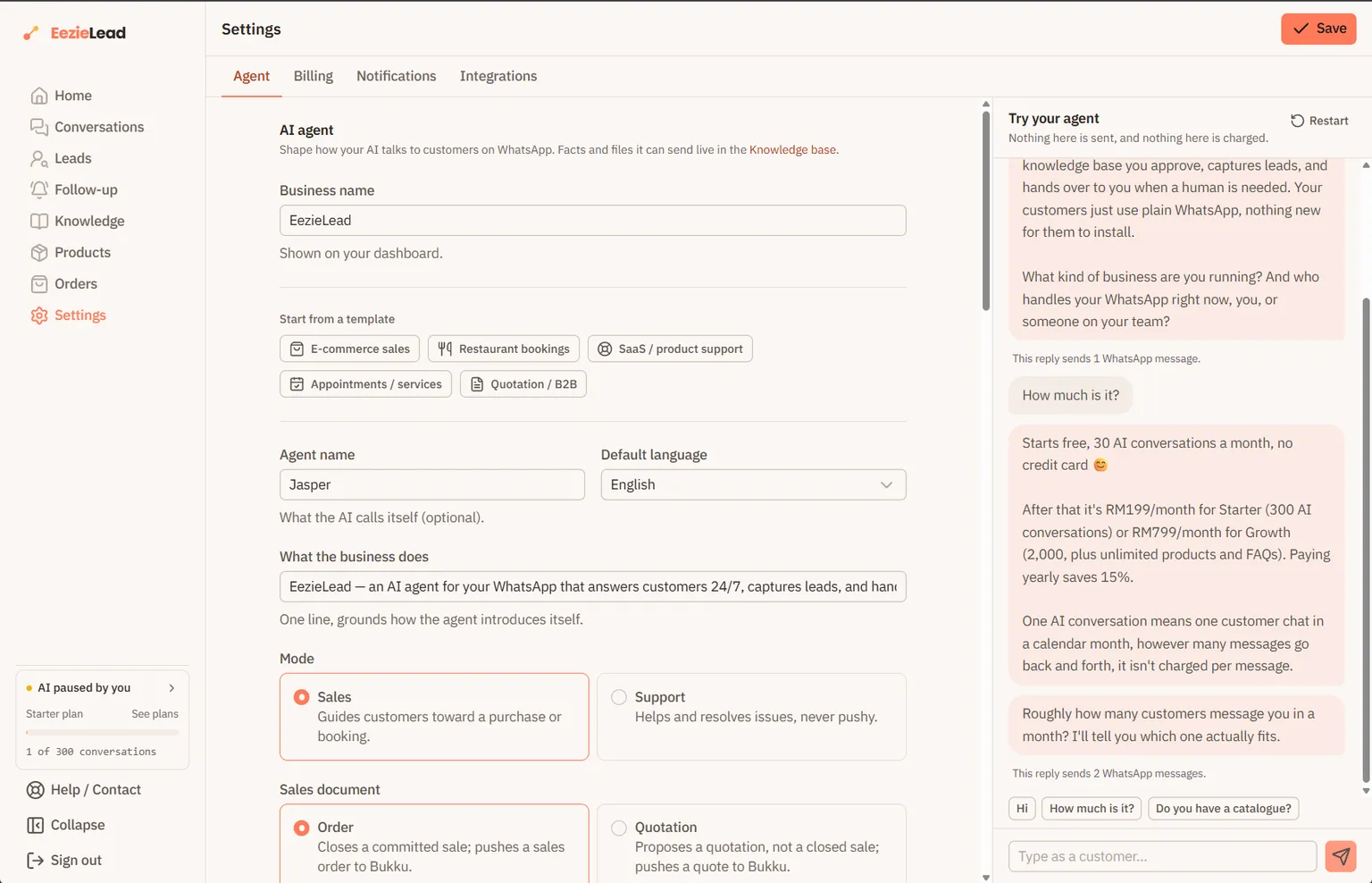
You can try a change before you save it
The preview reads the boxes as you've typed them, not the version that's saved. So you can change Tone & style, add an Example conversation, edit When to hand off to a human, and ask again straight away, without saving first and without leaving the page.
Two things do come from what's already saved: the facts on your Knowledge page and your Products, including any files the AI might send. Those are saved as you add them, so they're live in the preview too.
You're a brand new customer
Every preview conversation starts as someone who has never messaged you before. No past orders, no history. So if you ask "where's my order", it won't know, and that's correct rather than a fault.
What to ask it
Start with the suggestions under the box, then move on to what customers actually ask you: prices, what's in stock, opening hours, delivery areas, "can I speak to someone".
Watch for four things:
- Wrong details. Usually a fact that's missing or out of date on your Knowledge page.
- The wrong language. Check Default language.
- A tone that doesn't sound like your business. Fix it in Tone & style, or better, in Example conversations.
- Handing over to you too early, or not at all. That's When to hand off to a human.
Anything off is a setting or a missing fact, not a broken AI. Change it, ask again, hear the difference, then press Save.
The message count under each reply
Under each reply you'll see how many WhatsApp messages it would have been. That's worth watching, because from 1 October 2026 Meta charges per message, so it's what a reply like that would cost you. See message costs.
Two things decide that number, and both are yours to change:
- Your Example conversations. The AI copies the shape of the examples you gave it. If your examples are one flowing answer, its replies are too. If you split your examples into short back-and-forth messages, it does the same.
- The Message style setting, beside the preview. Grouped keeps a reply together and only splits it where your examples do. Short bubbles breaks longer replies up into extra messages.
If the replies come out vague
The preview tells you when this is why: with nothing on your Knowledge page and no Products, the AI has no facts to answer from, so all it can do is make small talk. Add a few of each, then try again.
How much you can practise
The preview is free and doesn't touch your plan's allowance. There is a limit so it stays that way: 30 replies an hour, and 300 a month. That's far more than tuning an agent needs, and if you do reach it the panel tells you which limit you hit and when it lifts. See plan limits.