How the AI replies: the 24-hour window and human takeover
Once your AI is switched on, EezieLead reads what a customer wrote, finds the answer in your FAQs and product directory, and replies in a natural, on-brand way, usually within seconds. Here's what decides when it answers, so nothing feels like a surprise.
If your AI isn't answering, it's one of those, and you don't have to guess which. The setup card at the bottom of your sidebar opens a panel that shows the first three as a short list with their current state, so the one that's holding you is visible rather than deduced. The fourth is your allowance, covered in plan limits.
Two of them surprise people:
- No knowledge means no reply at all. With no FAQs and no products the AI stays silent even when it's switched on, rather than making something up. Adding a few of each is what turns it on in practice.
- A brand-new account starts switched off, on purpose. See test before going live.
The 24-hour window
Once the AI is on, WhatsApp only lets businesses send free-form messages within 24 hours of the customer's last message. This is Meta's rule, not ours, and it shapes how the AI behaves.
| Situation | What the AI does |
|---|---|
| Customer messaged within the last 24 hours | Replies freely and automatically |
| More than 24 hours since their last message | Can't send a free-form reply; only an approved template can reach them |
So if a customer went quiet for a day or two and you want to re-open the chat, you have two ways to do it: send a pre-approved follow-up template from the Follow-up page in EezieLead, or simply message them by hand from your WhatsApp Business App, which stays free and needs no template, because your number is still on the app too.
Taking over a conversation
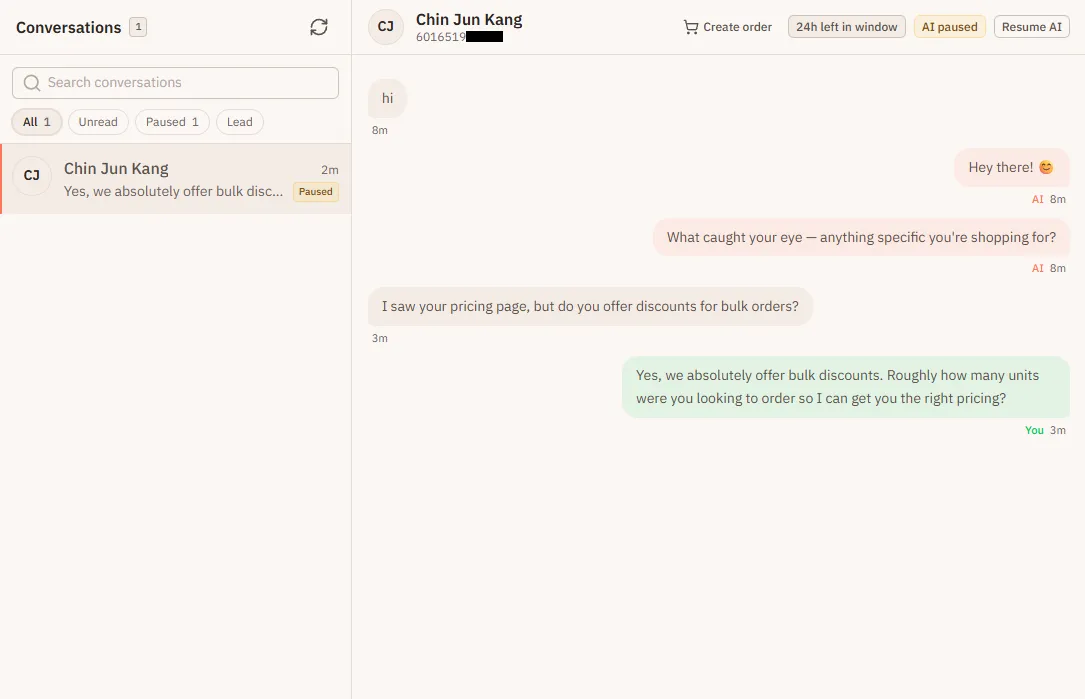
That's the whole takeover: you type, it steps aside. Use it for anything sensitive, high-value, or that just needs a human touch. The AI won't talk over you.
The switch at the top of Home is the bigger version of the same thing, and it covers every conversation at once. That's how you take the AI off duty entirely.
When the AI hands a chat to you by itself
Sometimes the AI steps aside without you typing anything. It does this when:
- the customer asks for a person, or complains
- the customer sends proof of payment, like a transfer screenshot or "I've paid"
- the AI isn't sure how to answer
- a customer orders more than your stock count shows
- a chat gets unusually busy, with 60 AI replies within an hour, which usually means an automated bot is on the other end
You get an alert, and the chat shows AI paused. It stays that way until you press Resume AI, so nothing goes back to the AI before you've looked. The monthly ceiling on AI replies is covered in plan limits.