How follow-ups work: one nudge to a lead who went quiet
Some customers ask a question, get their answer, and then go quiet. A follow-up is one short message that reaches them a few days later, so a lead does not slip away simply because nobody remembered to check back. If they answer, your AI picks the conversation up again as normal.
It lives on the Follow-up page, and it is available on the Starter plan and above.
Why Meta checks the message first
Your AI writes a fresh reply to whatever a customer says, but WhatsApp only allows that within 24 hours of the customer's last message. How the AI replies covers that rule in full.
A follow-up goes out days later, so it always lands outside those 24 hours. The only way WhatsApp lets you reach someone that far out is with a message Meta has read and approved beforehand. Meta and the app both call that a template.
That is the one thing about follow-ups that works differently from the rest of EezieLead. You write the message once, Meta checks it, and from then on it sends by itself.
Setting it up
Press Set up follow-up
The Follow-up page starts with a single button. Everything after this is three short screens.
Check what it says
The AI writes a first draft for you, in the same voice as the rest of your replies. Read it, and change anything that does not sound like you. If you would rather it tried again, type what you want in the box under Not happy with it?, for example warmer and shorter, and press Redraft with AI.
Two things keep a message simple and get it approved faster. Keep it to one job, earning a reply. And leave out names, order numbers, and anything else that would be a blank you fill in later, because a message with no blanks in it clears Meta's check more easily.
Choose when it goes out
Send after a number of days of no reply, and Only send between two hours of the day in your timezone. This is one setting for your whole business, and you can change it any time.
Send it to Meta
The last screen shows how the message will look in a real chat, and a short Before it goes list that points out the wording Meta usually turns down. When it looks right, press Send to Meta for review.
While Meta is checking it
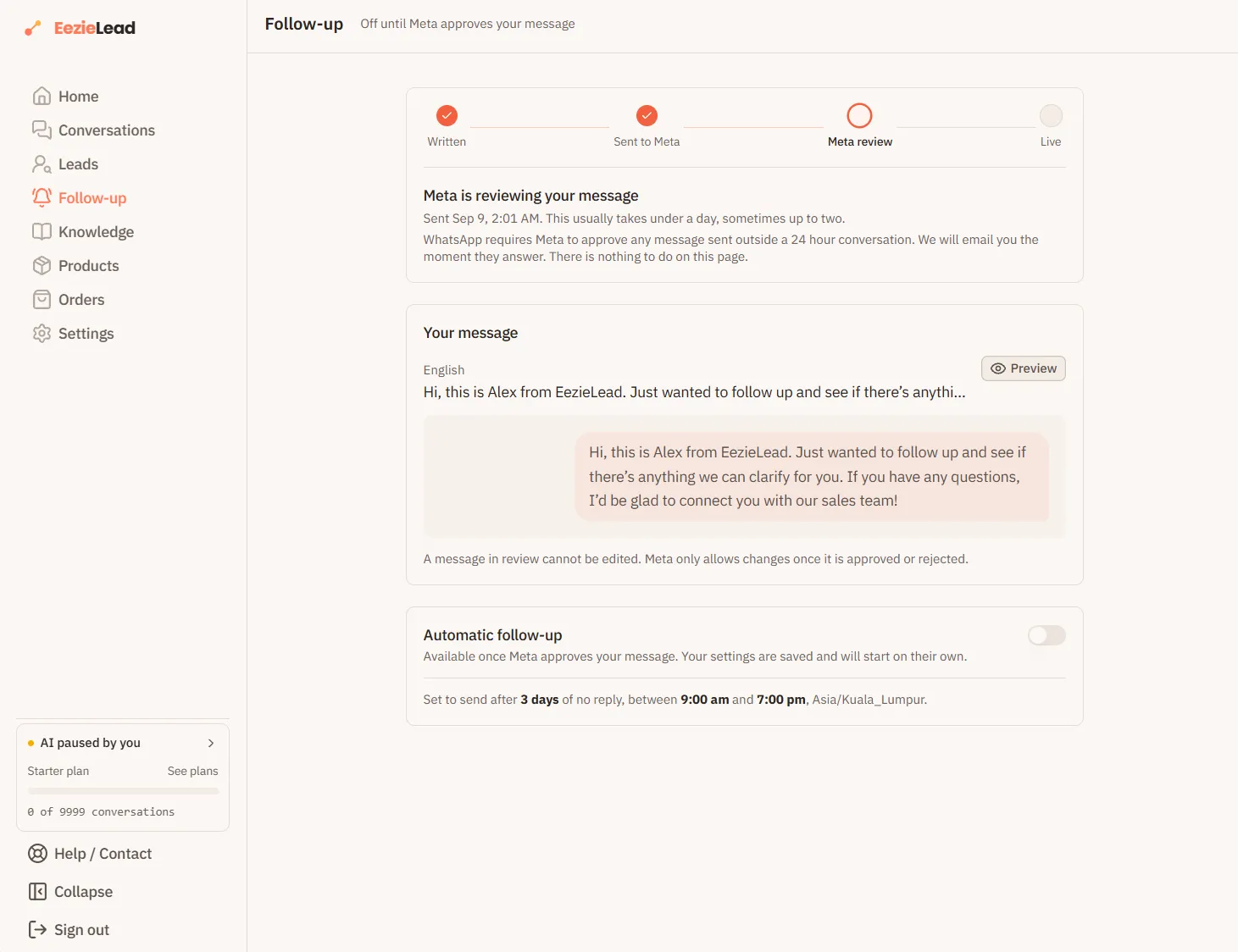
The page turns into a four step line, Written, Sent to Meta, Meta review, Live, with the third step lit up.
This usually takes under a day, sometimes up to two. We email you the moment Meta answers, so there is nothing to watch and nothing to do on that page. You can close it.
Once it is live
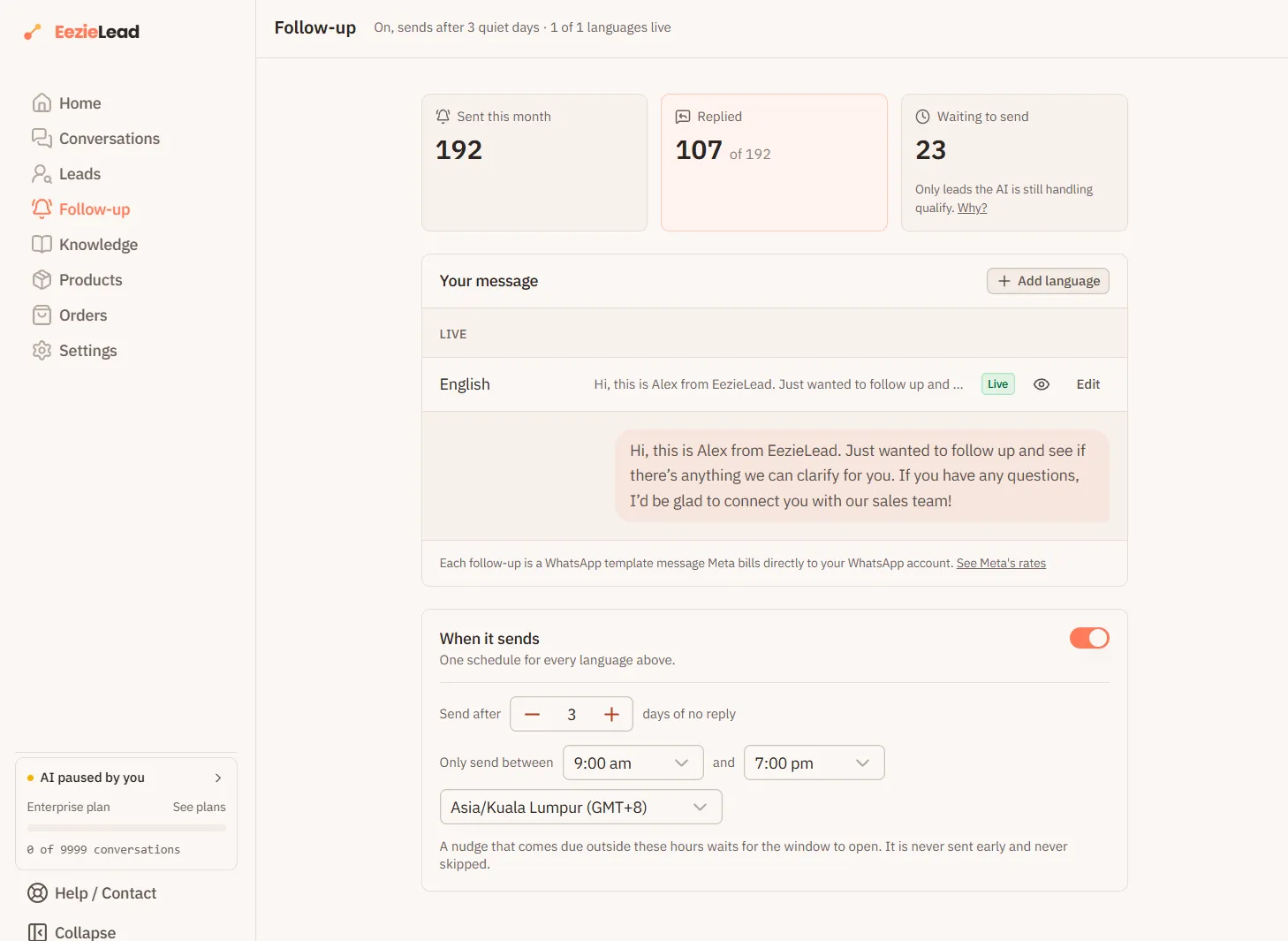
The page becomes a small dashboard with three numbers.
| Number | What it means |
|---|---|
| Sent this month | Follow-ups that have gone out since the start of this month |
| Replied | How many of those customers answered. This is the one worth watching |
| Waiting to send | Quiet leads that are queued up for a nudge |
Waiting to send is usually lower than the number of quiet leads you expect, and that is on purpose. A lead only qualifies while the AI is still handling the conversation. Once you have replied from your phone, that customer is yours, and no automatic message will go out on top of you.
Under When it sends you can change the schedule at any time, or switch follow-ups off entirely with the toggle. A nudge that falls due outside your chosen hours waits until the hours open again. It is never sent early, and it is never skipped.
If Meta turns it down
It happens, and it is fixable. The page shows Meta's own reason, in Meta's words, and then rewrites the message for you automatically. You see the old wording and the new one side by side, and you either press Resubmit to Meta or Edit myself if you would rather word it your own way.
A message that has been turned down can be changed as often as you like, and each new version is checked in under a day.
Two things cause most refusals, and the app warns you about both before you submit:
- A promotional message filed as a plain, useful one. Meta sorts every message into one of two kinds, a plain useful message or a promotional one, and each is priced differently. Discount and offer wording in the useful slot is usually refused. Either soften the wording or change the kind on the review screen.
- A blank left in the message, such as a spot for a customer's name. Follow-ups work best with no blanks at all.
More than one language
Press Add language and we will draft the same nudge in the language you pick. Each language is checked by Meta separately and takes its own day or two.
Until a new language is approved, customers who chat in it still get your first approved message, so nobody is left without a nudge while you wait.
What it costs
| What goes out | Who charges you |
|---|---|
| A follow-up sent from EezieLead | Meta, directly to your WhatsApp account |
| Your AI replying inside the normal 24 hours | Covered by your EezieLead plan |
| A message you send by hand from the WhatsApp Business App | Nobody, it stays free |
EezieLead does not add a markup to follow-ups. Meta's current rates are on their pricing page, and message costs explains the wider picture of who bills you for what.